
Have you heard of the Gramps genealogy software project? In this post, learn about this free, open-source software and how you can use it for your family tree research.
If you are looking for an alternative to hosting your family tree online, and don't want to invest a lot of money into an expensive software, Gramps might be for you.
The Gramps genealogy software can serve as a way to keep a local backup of your family tree information, or the main place that you build your family tree. I am excited about the many different ways that this software can help take my research to the next level.
What is Gramps?
Gramps is a free, open-source genealogy software that was developed by genealogists for genealogy. The project began more than 25 years ago and has developed into a comprehensive family tree building program.
The Gramps genealogy software allows you to build a family tree on your computer, add photographs and documents, create charts and maps, generate GEDCOM files, and much more.
In order to use Gramps, you need a desktop or laptop computer. There are versions of Gramps that have been developed for computers running Windows, Apple, or Linus operating systems, so basically any computer can run the software.
There is also a web version of Gramps, but it is more technical to install and maintain. This article focuses on the desktop software.
Where can you download it?
You can download Gramps to your computer directly from the Gramps project download page.
I downloaded the Microsoft Windows version of the Gramps software, and then I had to double-click on the file in order to begin the installation.
Some people report that their Windows anti-virus doesn't recognize the program and gives them an alert. Since I knew that I was downloading a safe file, I chose to install and run the program anyway.
How to learn how to use Gramps
The Gramps software has a lot of features, and the user interface is not as intuitive as some software and websites that many of us are accustomed to using. Fortunately, there are lots of great resources on the internet that provide information and tutorials for using the software.
Below are some resources that I have found helpful for learning the basics of how to use Gramps:
- TechTutorials Gramps YouTube Playlist
- Gramps sub-Reddit (a forum on Reddit for Gramps users)
- Start with Genealogy Gramps wiki page (detailed instructions)
- Complete Gramps documentation
There are many additional YouTube videos and blog posts about Gramps. I also plan on writing additional articles on how to use Gramps, so please let me know if you have specific questions and I can address them.
Notable features of Gramps
The Gramps software has many, many capabilities, but I chose just a few to discuss here in this article. Hopefully, it will give you some ideas about how it can be helpful for you for your family tree.
I've only just begun to use Gramps, so the takeaways from this article are only my initial impressions of the software. I'm sure that a more experienced user could share a much longer list of its useful features!
Dashboard
When you first load your family tree in Gramps, you can click on the dashboard to see a variety of statistics and other data summarizing your family tree. In order to see data summaries, you should right click and choose "Add a gramplet", and choose the summary that you would like to see.
I thought the age statistics for my family tree were very interesting. It shows the lifespan distribution for people in my tree, as well as the parent/child age difference distribution for my relatives, which is something that I had previously considered manually calculating.
8% of the people in my family tree lived past the age of 90, which I found very interesting!

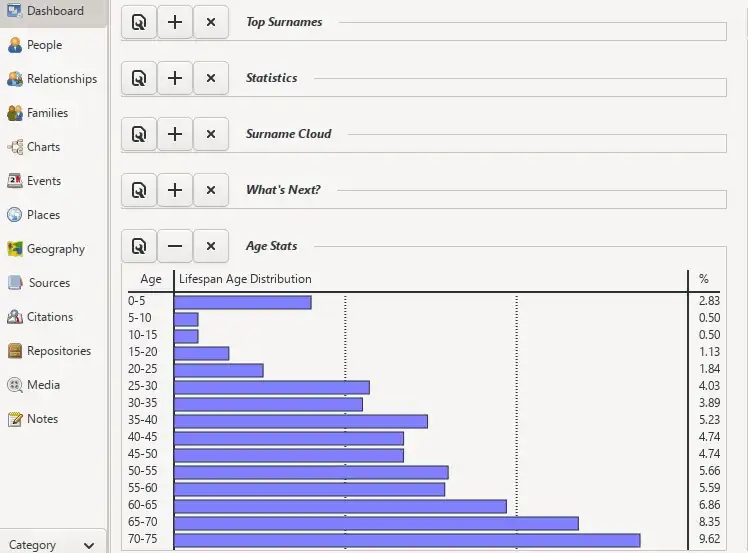
There are also summaries of the top surnames in your tree, a surname cloud, statistical overviews, and many other data summaries. I think that many of these summaries can help us learn where to focus our efforts and provide valuable insights into our ancestors.
Quickly create charts
There are many ways to view events in your family tree in maps, make pedigree and descendant charts, and view relationships within Gramps. You can also view the different media that you have uploaded to your tree.
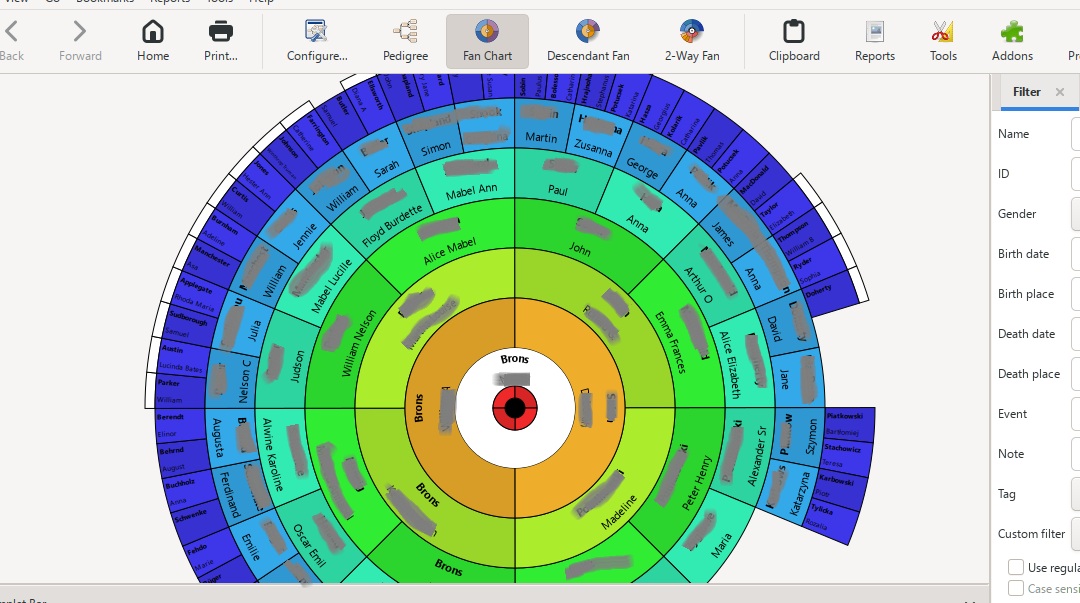
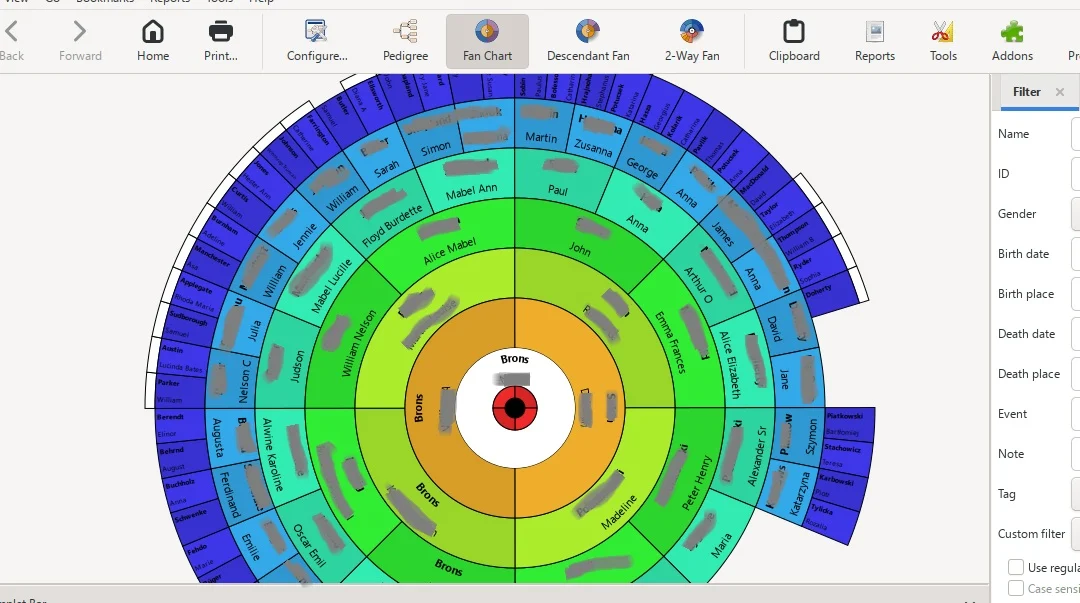
I made this fan view of my family tree within a few minutes of importing my family tree from Ancestry into the software. You can easily change the colors, number of generations, and style of the fan chart.
Ability to automatically generate reports, books, and text based on your tree
Gramps has some very cool features that you can use to quickly generate visual and text reports, and even books, based on data from your family tree. This is a great way to share your research with family and others who might be interested.
I was able to generate a 119-page detailed ancestry report for myself that included details about more than 1000 of my ancestors. I don't have any media uploaded to my Gramps tree yet, but once I upload photographs and other documents to my Gramps tree, I could automatically include these items in a book generated by the software.
I also used the software to create a 24-page detailed descendant report for John Alden, my 11th great-grandfather and a Mayflower passenger. The report includes all of his descendants down to my children.
This is a great starting point on creating family history documents to share with others.
Conclusion
I hope that you found this article about the free Gramps project software to be interesting and helpful! If you end up giving Gramps a try, I would love to hear from you in the comments.
As always, if you have any questions about something that you read here, or if you have any tips about using Gramps that you would like to add, please feel free to join in the discussion below.
Thanks for reading today!
Joan
Saturday 14th of February 2026
Interesting tip!
Julia
Saturday 14th of February 2026
Thank you for this one. It sounds super-interesting. I like the book idea the best!
Mercedes
Sunday 22nd of February 2026
I thought this was very intriguing, too! Could have lots of great uses for compiling family tree research. Sincerely, Mercedes